
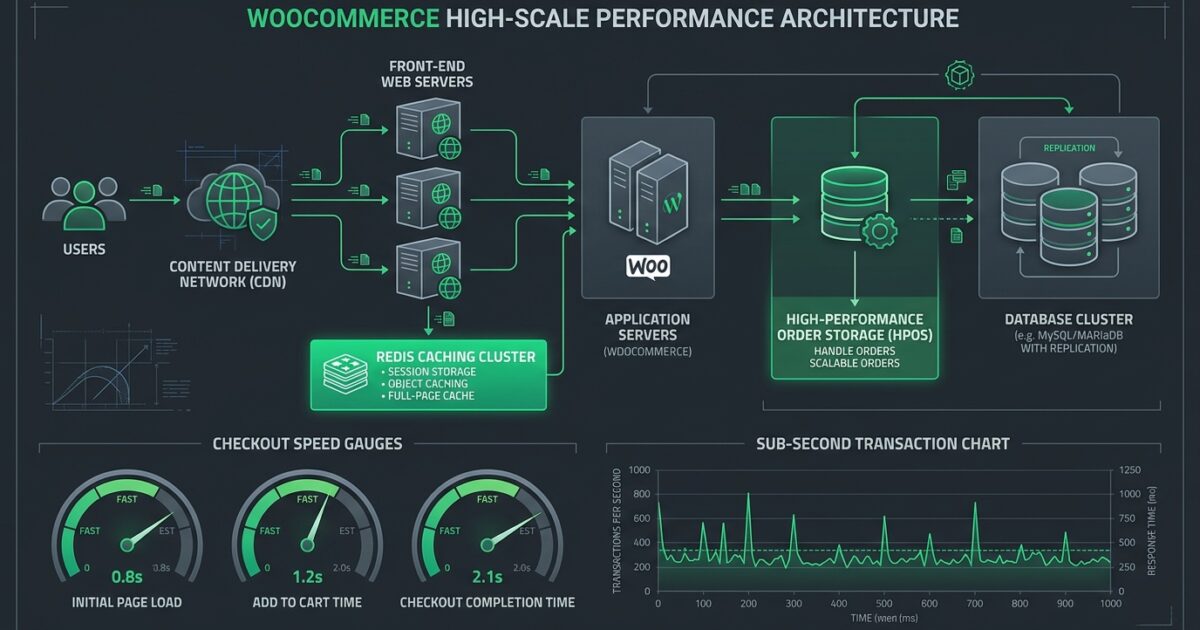
- Enable WooCommerce High-Performance Order Storage (HPOS) to decouple orders from the slow
wp_postsandwp_postmetatables. - Migrate PHP sessions and cart fragments to in-memory Redis Object Cache with persistent connections.
- Tune MySQL
innodb_buffer_pool_sizeto hold 80% of active working memory. - Disable AJAX cart fragments script (
wc-cart-fragments.js) on non-shop pages to eliminate uncacheable admin-ajax hits.
Scaling a WooCommerce store to handle thousands of daily transactions requires moving beyond generic caching plugins. Because checkout flows, cart calculations, and customer sessions are fundamentally dynamic and uncacheable by traditional static HTML caches, high-concurrency stores require architectural optimization at the database, object cache, and PHP application layers.
1. The Four Primary Bottlenecks in High-Traffic WooCommerce Stores
When high-volume stores experience checkout slowdowns or database crashes during flash sales, the root cause almost always traces back to four architectural friction points:
- Monolithic Postmeta Order Storage: Historically, WooCommerce stored each order as a custom post type in
wp_posts, spreading order items, addresses, and customer data across 30+ rows inwp_postmetaper order. Under high load, table locks and full-table scans bring MySQL to a halt. - AJAX Cart Fragments Overload: The legacy cart fragments script sends an uncached POST request to
/wp-admin/admin-ajax.php?action=woocommerce_get_refreshed_fragmentson every single page load, booting the entire WordPress core for every visitor. - Transient Bloat in wp_options: Customer cart tokens and temporary rates piling up into hundreds of megabytes in the autoloaded
wp_optionstable. - PHP-FPM Worker Starvation: Checkout requests taking > 1,500ms to complete, consuming all available PHP-FPM execution slots and resulting in 504 Gateway Timeouts.
2. High-Performance Order Storage (HPOS) Architecture
WooCommerce High-Performance Order Storage (HPOS) replaces legacy postmeta with dedicated, indexed relational tables specifically structured for commerce:
| Metric | Legacy Postmeta Storage | HPOS (Custom Order Tables) | Improvement |
|---|---|---|---|
| Order Insertion Speed | 320ms – 650ms | 65ms – 110ms | 5x Faster |
| Admin Order Search | 4.2s (Table scan) | 0.15s (Indexed search) | 28x Faster |
| Database Table Lock Risk | High (Shared with posts) | Zero (Dedicated tables) | Eliminated |
To verify and enable HPOS, navigate to WooCommerce > Settings > Advanced > Features and select “High-performance order storage”. Ensure all third-party payment and shipping extensions declare HPOS compatibility before completing the database synchronization.
3. Redis In-Memory Object Caching for Sessions
Because cart items and customer authentication cannot be cached as static HTML, you must configure Redis Object Cache Pro to handle volatile object queries directly in server RAM. Add the following cache group exclusions to your wp-config.php:
4. Disabling Cart Fragments on Non-Commerce Pages
Eliminate unnecessary server load by restricting the wc-cart-fragments.js script exclusively to product, cart, and checkout templates:
5. Automated WooCommerce Transient Maintenance
Run a weekly cron or database cleanup to purge expired customer sessions and transient tokens from wp_options: